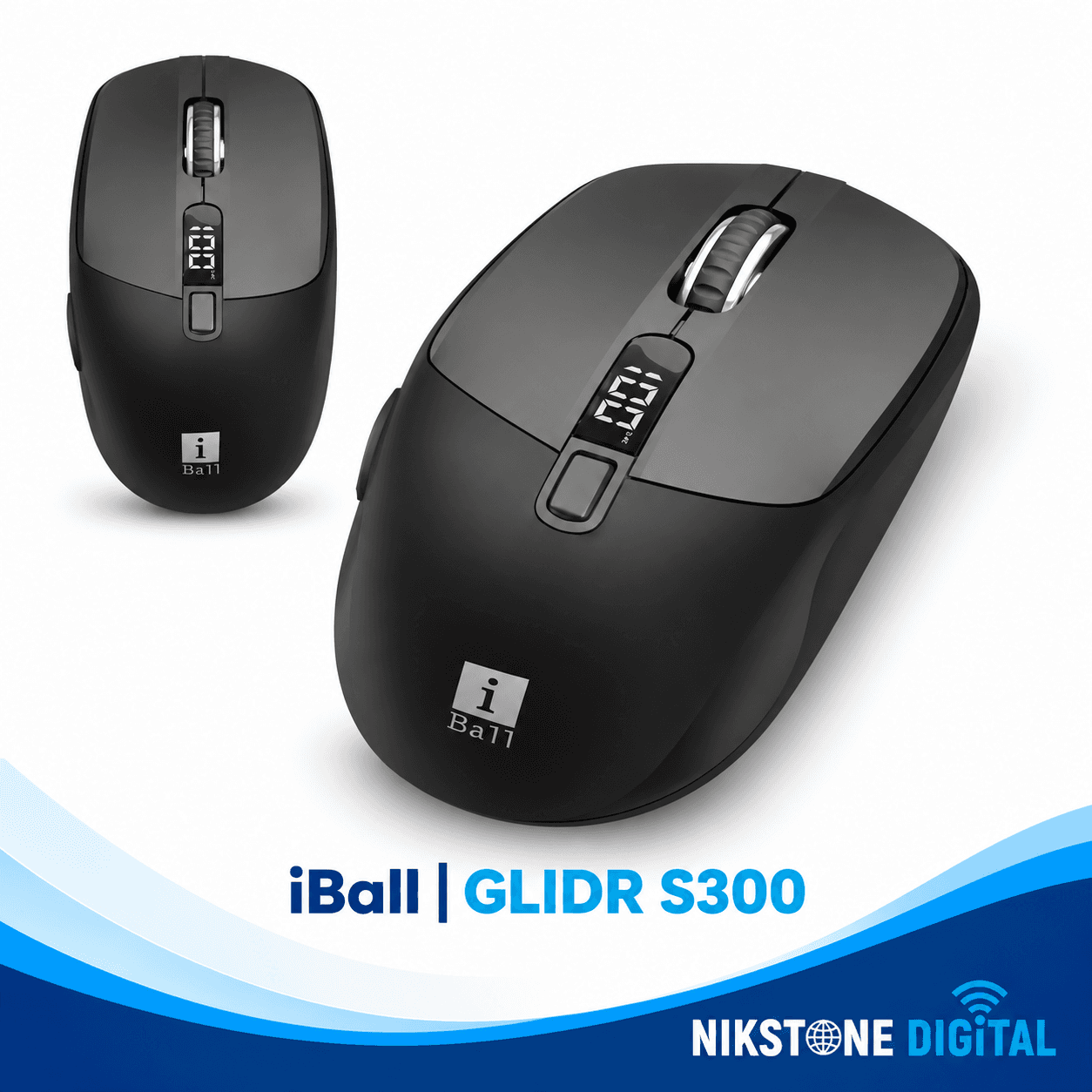
iBall GLIDR S300 Wireless Mouse
The iBall GLIDR S300 Wireless Mouse is designed for users who want flexible connectivity, precise cursor control and convenient rechargeable power in one modern device. Whether you are working on your laptop, managing office tasks, browsing the internet or switching between multiple computers, the GLIDR S300 offers practical features for everyday productivity.
Featuring 2.4 GHz wireless connectivity, two Bluetooth modes, adjustable DPI up to 3200, six-button control and a smart status display, this wireless mouse combines versatile device connectivity with convenient on-mouse controls. Its built-in rechargeable battery and USB Type-C charging make it a practical addition to a modern workspace.
Dual Bluetooth and 2.4 GHz Wireless Connectivity
Connect with up to two Bluetooth devices and one USB receiver connection.
The iBall GLIDR S300 supports 2.4 GHz wireless connectivity and two Bluetooth modes, giving you flexibility when connecting compatible devices. You can use the USB receiver for one device and Bluetooth for two additional device profiles, then switch between the available modes using the mouse's mode control.
This multi-device functionality is useful for people who work across a laptop, desktop computer or compatible Bluetooth-enabled device. It helps reduce the need to keep multiple mice on your desk.
The 2.4 GHz wireless connection offers an operating range of up to 10 metres without obstacles, according to the manufacturer. Actual performance may vary depending on interference and the surrounding environment.
Adjustable DPI Up to 3200
Choose the cursor sensitivity that suits your work.
The GLIDR S300 features four selectable DPI settings: 800, 1600, 2400 and 3200 DPI. Adjusting the DPI changes cursor sensitivity, allowing you to choose between more controlled movement and faster navigation across your screen.
800 DPI: For slower, more controlled cursor movement.
1600 DPI: For balanced everyday browsing and office tasks.
2400 DPI: For faster navigation across larger screens.
3200 DPI: For higher cursor sensitivity and quick movement.
The dedicated DPI adjustment makes it convenient to change sensitivity without navigating through your computer's settings.
Smart Status Display
See important mouse information at a glance.
The iBall GLIDR S300 includes a smart status display designed to show useful information, including battery level, selected connectivity mode and DPI setting.
This display helps you check the mouse's operating status more conveniently while working. It also makes it easier to identify the current connection mode when switching between devices.
Six-Button Control for Better Productivity
Convenient controls for everyday navigation.
The GLIDR S300 features a six-button layout designed to provide convenient control during everyday computer use. Its controls support standard navigation, scrolling and access to additional mouse functions.
The mouse is rated for a button life of up to 3 million cycles, according to the manufacturer. Actual button longevity depends on usage and operating conditions.
High-Precision Optical Sensor
Enjoy responsive cursor movement for daily tasks.
The iBall GLIDR S300 uses an optical sensor designed for accurate cursor tracking. Combined with its four-level DPI adjustment, it provides flexibility for browsing websites, working with documents, managing files and completing other everyday computing tasks.
Built-In Rechargeable Battery
Convenient power without routine disposable battery replacement.
The GLIDR S300 features a built-in rechargeable battery for convenient everyday use. Instead of replacing standard disposable batteries, you can recharge the mouse using its supplied USB Type-C to USB-A charging cable.
The mouse also includes an auto sleep mode designed to reduce power consumption when it is inactive. Battery performance depends on usage, selected connectivity mode and operating conditions.
USB Type-C Charging
Recharge using the supplied charging cable.
The USB Type-C charging connection makes powering the GLIDR S300 convenient. The supplied cable connects the mouse's Type-C charging port to a compatible USB-A power source.
Follow the manufacturer's charging instructions and use a compatible power source for safe and reliable charging.
Designed for Multi-Device Workspaces
The iBall GLIDR S300 is suitable for users who regularly switch between compatible computers and Bluetooth-enabled devices. Its multiple connectivity modes can simplify a workspace used for office work, online learning, browsing and general productivity.
Before purchasing, check that your devices support the required Bluetooth connection or have a compatible USB port for the supplied receiver.
iBall GLIDR S300 Wireless Mouse Specifications
Brand: iBall
Series: GLIDR
Model: S300
Product Type: Rechargeable Wireless Optical Mouse
Colour: Black
Connectivity: 2.4 GHz wireless + two Bluetooth modes
DPI Settings: 800 / 1600 / 2400 / 3200 DPI
Maximum DPI: 3200 DPI
Sensor: Optical
Number of Buttons: 6
Button Life: Up to 3 million cycles
Wireless Range: Up to 10 metres without obstacles
Status Display: Yes
Battery: Built-in rechargeable battery
Charging Interface: USB Type-C
Power-Saving Feature: Auto sleep mode
Dimensions: Approximately 7.1 × 10.5 × 4.5 cm (W × D × H)
Net Weight: Approximately 75 g
Country of Origin: People's Republic of China
Package Contents: 1 mouse, 1 USB receiver, 1 Type-C to USB-A cable and 1 QR code guide
Warranty: Confirm the applicable warranty for the exact unit and purchase in India before publishing.
Frequently Asked Questions
What is the iBall GLIDR S300 Wireless Mouse?
The iBall GLIDR S300 is a rechargeable wireless optical mouse featuring 2.4 GHz connectivity, dual Bluetooth modes, adjustable DPI and a smart status display.
Does the iBall GLIDR S300 support Bluetooth?
Yes. It supports two Bluetooth modes in addition to 2.4 GHz wireless connectivity through the supplied USB receiver.
What DPI settings are available on the GLIDR S300?
The mouse offers four DPI settings: 800, 1600, 2400 and 3200 DPI.
Can I connect the GLIDR S300 to multiple devices?
Yes. Its connectivity options support up to three device connections: one through the 2.4 GHz USB receiver and two through Bluetooth. You can switch between the available modes.
Does the iBall GLIDR S300 have a battery display?
Yes. Its smart status display provides battery-level information along with connectivity mode and DPI status.
How do I charge the iBall GLIDR S300?
Use the supplied USB Type-C to USB-A charging cable and a compatible USB power source, following the product instructions.
Is the GLIDR S300 suitable for office work?
Yes. Its adjustable DPI, multiple connectivity modes, six-button design and rechargeable battery make it suitable for everyday office work, browsing and general productivity.
What is included in the box?
The listed package contents are the mouse, USB receiver, Type-C to USB-A cable and QR code guide.
Buy iBall GLIDR S300 Wireless Mouse
Upgrade your workspace with the iBall GLIDR S300 Wireless Mouse, featuring dual Bluetooth modes, 2.4 GHz wireless connectivity, adjustable DPI up to 3200, a smart status display and convenient USB Type-C charging.
Its multi-device functionality and rechargeable design make it a practical choice for users who want flexible connectivity and convenient control across compatible devices.
Explore the iBall GLIDR S300 at NikStone Digital and choose a versatile wireless mouse for your everyday computing setup.