ChatGPT Christmas Photo Editing Prompt: Create a Luxury Christmas Photoshoot
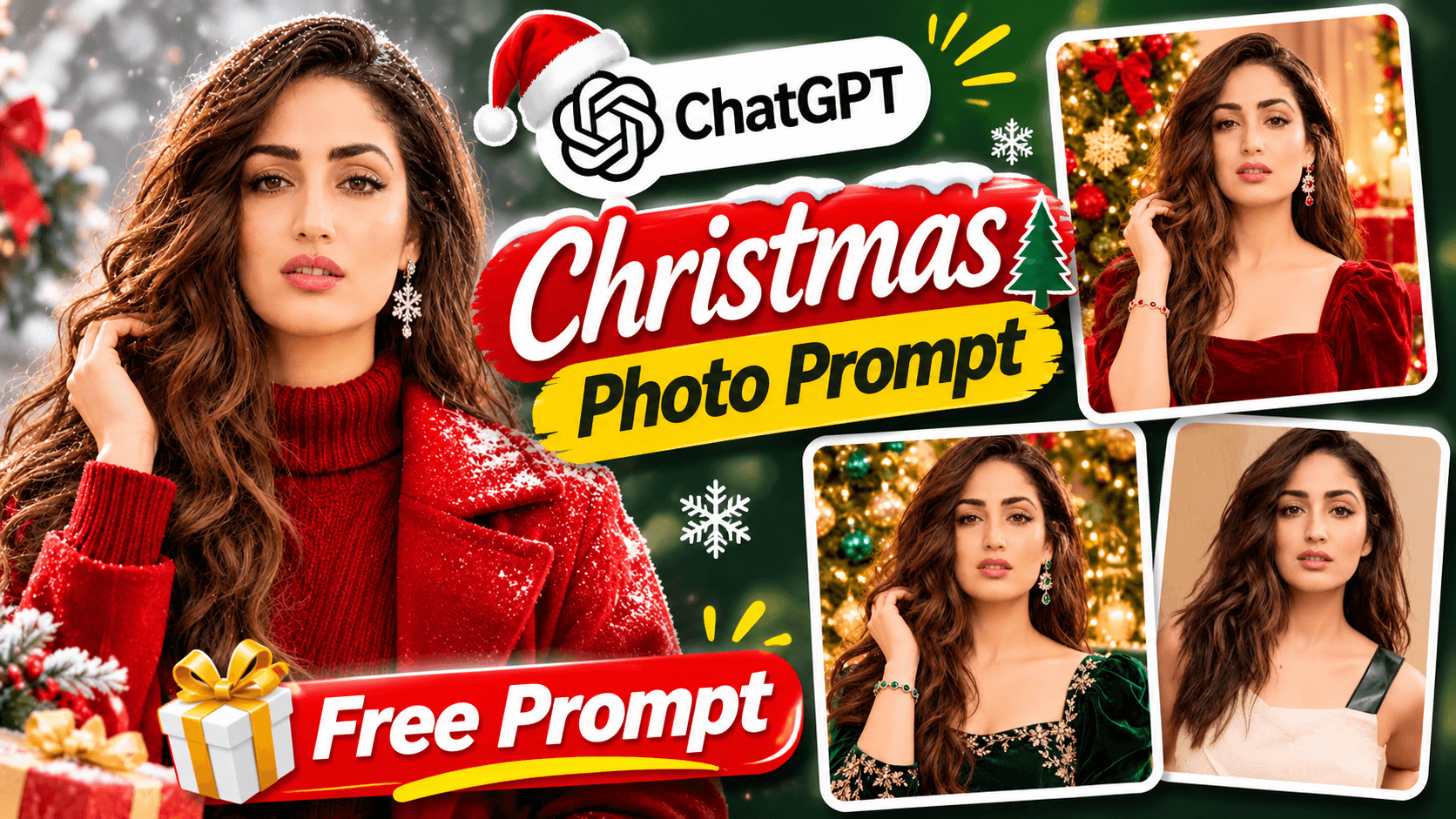
Create a stunning Christmas photoshoot using ChatGPT AI. Transform your photo into a premium festive portrait with Christmas decorations, golden fairy lights and beautiful outfits. Get the main prompt plus three bonus styles: Luxury Red, Green Festive and Winter Christmas.
ChatGPT Christmas Photo Editing Prompt: Create a Luxury Christmas Photoshoot
Want to create a beautiful Christmas photoshoot using your own photograph? With ChatGPT AI, you can transform an ordinary picture into a stunning festive portrait featuring a decorated Christmas tree, glowing golden lights, elegant Christmas outfits and a luxury festive background.
In this guide, you will get a ready-to-use ChatGPT Christmas photo editing prompt to create a realistic professional Christmas portrait while keeping your original recognizable appearance.
You will also get three bonus Christmas photo editing prompts to explore different festive styles: Luxury Red Christmas, Green Festive Christmas and Winter Christmas.
What Is a ChatGPT Christmas Photo Editing Prompt?
A ChatGPT Christmas photo editing prompt is an instruction that helps AI transform your uploaded photograph into a professional Christmas-themed portrait.
Instead of simply adding Christmas decorations to your picture, this prompt describes the outfit, background, lighting, pose and festive atmosphere to create a complete Christmas photoshoot look.
With this prompt, you can create:
Luxury Christmas studio portraits.
Elegant red velvet and festive outfits.
Beautiful Christmas tree backgrounds.
Golden fairy lights and glowing decorations.
Winter-inspired portraits with snow and pine trees.
The prompt is designed to preserve the person's recognizable facial appearance while transforming the overall photoshoot style.
ChatGPT Christmas Photo Editing Prompt: Copy the Main Prompt
Ready to create your own Christmas portrait?
Upload a clear photograph to ChatGPT, copy the complete prompt below and submit it.
Copy the main Christmas AI prompt:
Transform the uploaded photograph into a stunning, ultra-realistic premium Christmas photoshoot portrait of the SAME PERSON.

IMPORTANT: PRESERVE ORIGINAL FACE IDENTITY
Use the uploaded photograph as the primary and exact identity reference.
Preserve the person's recognizable facial identity, face shape, eyes, eyebrows, nose, lips, hairstyle, hair color, skin tone, beard or facial hair (if present), and all distinctive facial characteristics.

The final photograph must clearly look like the same person from the original uploaded image.

Do not replace the person's identity or create a random model.

CHRISTMAS OUTFIT AND STYLING:
Dress the person in an elegant and stylish Christmas-inspired outfit.

For women:
- Elegant red velvet dress or premium Christmas party outfit.
- Subtle festive accessories.
- Beautiful natural hairstyle.

For men:
- Premium red or dark green sweater, stylish blazer or elegant Christmas party outfit.
- Sophisticated festive styling.

Keep the clothing realistic, elegant and appropriate for the person.

CHRISTMAS ENVIRONMENT:
Create a beautiful luxury Christmas photoshoot setting featuring:

- A large beautifully decorated Christmas tree.
- Warm glowing golden fairy lights.
- Elegant red and gold Christmas ornaments.
- Beautiful wrapped Christmas gifts.
- Subtle festive decorations.
- Soft glowing candles and warm ambient lighting.

POSE AND EXPRESSION:
Create a natural, confident and attractive photoshoot pose.

The person may stand beside the Christmas tree, sit elegantly near the gifts or gently hold a beautifully wrapped Christmas present.

Maintain realistic body proportions and natural expressions.

LIGHTING AND PHOTOGRAPHY:
Professional DSLR Christmas photoshoot, cinematic warm golden lighting, soft background bokeh, realistic skin texture, natural shadows, premium editorial photography and beautiful festive color grading.

COMPOSITION:
Create a professional portrait photograph with the person's face clearly visible.
Use a beautifully decorated Christmas background with balanced composition.
Make the person the main focus while keeping the Christmas decorations visible.

IMAGE QUALITY:
Ultra-realistic photography, high-resolution details, professional portrait photography, realistic fabric textures, natural skin details, beautiful lighting and premium Christmas editorial quality.

IMPORTANT RESTRICTIONS:
- Preserve the original person's recognizable facial identity.
- Do not change the person's gender or distinctive facial characteristics.
- Avoid distorted hands, extra fingers and unnatural body proportions.
- Avoid plastic-looking skin or excessive beauty filters.
- Do not add text, logos or watermarks.
- Do not create a cartoon or anime image.

FINAL RESULT:
Create a beautiful, realistic, premium Christmas photoshoot portrait that looks like it was captured by a professional photographer in a luxury Christmas studio.
Bonus Prompt 1: Luxury Red Christmas
Want a glamorous Christmas portrait with rich red colors and golden decorations? Try this Luxury Red Christmas variation.
Copy the Luxury Red prompt:
Luxury Red Christmas
Create a luxury red Christmas photoshoot of the same person. Preserve the exact facial identity and recognizable features. Use an elegant red velvet outfit, a beautifully decorated Christmas tree, golden fairy lights, premium Christmas gifts and warm cinematic lighting. Create an ultra-realistic luxury festive portrait.
This style focuses on a rich red velvet outfit, golden decorations and a warm luxury Christmas studio atmosphere.
Bonus Prompt 2: Green Festive Christmas
For a sophisticated festive look, try this Green Festive Christmas variation with dark green clothing and golden ornaments.
Copy the Green Festive prompt:
Green Festive Christmas
Create an elegant green Christmas photoshoot of the same person. Preserve the exact facial identity. Use sophisticated dark green festive clothing, beautiful Christmas tree decorations, golden ornaments, warm fairy lights and a luxurious festive studio background. Create premium realistic Christmas photography.
This variation creates an elegant green-themed Christmas portrait with a premium festive appearance.
Bonus Prompt 3: Winter Christmas
Want a dreamy winter-inspired Christmas photoshoot? Try this Winter Christmas variation featuring snow, pine trees and soft cinematic lighting.
Copy the Winter Christmas prompt:
Winter Christmas
Create a beautiful winter Christmas photoshoot of the same person. Preserve the exact facial identity. Use elegant winter clothing, a snow-inspired Christmas background, decorated pine trees, soft snowfall, glowing fairy lights and dreamy cinematic lighting. Create an ultra-realistic premium winter portrait.
This version focuses on a beautiful winter atmosphere with snow-inspired decorations and dreamy lighting.
How to Create a Christmas Photoshoot Using ChatGPT
Follow these simple steps to create your AI Christmas portrait:
Step 1: Open ChatGPT on your mobile or computer.
Step 2: Upload a clear photograph where your face is visible.
Step 3: Copy the main Christmas photo editing prompt from this article.
Step 4: Paste the prompt into ChatGPT and submit your request.
Step 5: After generating your main Christmas portrait, try any of the three bonus variations to explore another festive style.
For the bonus prompts, use the same original photograph and, where possible, continue in the same conversation to help maintain visual consistency.
Which Christmas AI Photoshoot Style Should You Try?
Each variation offers a different Christmas photography concept:
Main Christmas Style: A luxury Christmas studio portrait with a decorated tree, golden lights and festive outfits.
Luxury Red Christmas: A glamorous red velvet outfit with golden Christmas decorations.
Green Festive Christmas: A sophisticated dark green outfit with elegant golden ornaments.
Winter Christmas: A dreamy winter portrait with snowfall, pine trees and glowing fairy lights.
You can try all four styles and choose the festive portrait you like most.
Tips for Better Christmas AI Photo Editing Results
Use a clear, high-quality photograph.
Choose a picture where your facial features are clearly visible.
Use a reference photo with natural lighting.
Make sure your original hairstyle and appearance are visible.
Try different variations to explore different Christmas themes.
AI-generated results may vary depending on the uploaded photograph and image model. Facial identity, clothing details and small decorations may not be reproduced perfectly in every attempt.
Final Thoughts
Creating a professional Christmas photoshoot can be a fun way to explore AI photo editing. With this ChatGPT Christmas photo editing prompt, you can transform your ordinary photograph into a beautiful festive portrait with elegant outfits, glowing Christmas decorations and a premium studio atmosphere.
And there is more to explore! Try the Luxury Red Christmas, Green Festive Christmas and Winter Christmas bonus prompts to create three additional festive styles.
Copy the prompts, upload your photograph and create your own Christmas AI photoshoot!
Explore More AI Photo Editing Prompts
Try these other creative AI transformations:
Visit NikStone Digital for more AI tools, creative prompts and practical digital resources.