Family Photo Restoration Prompts: Restore Old Photos with ChatGPT AI
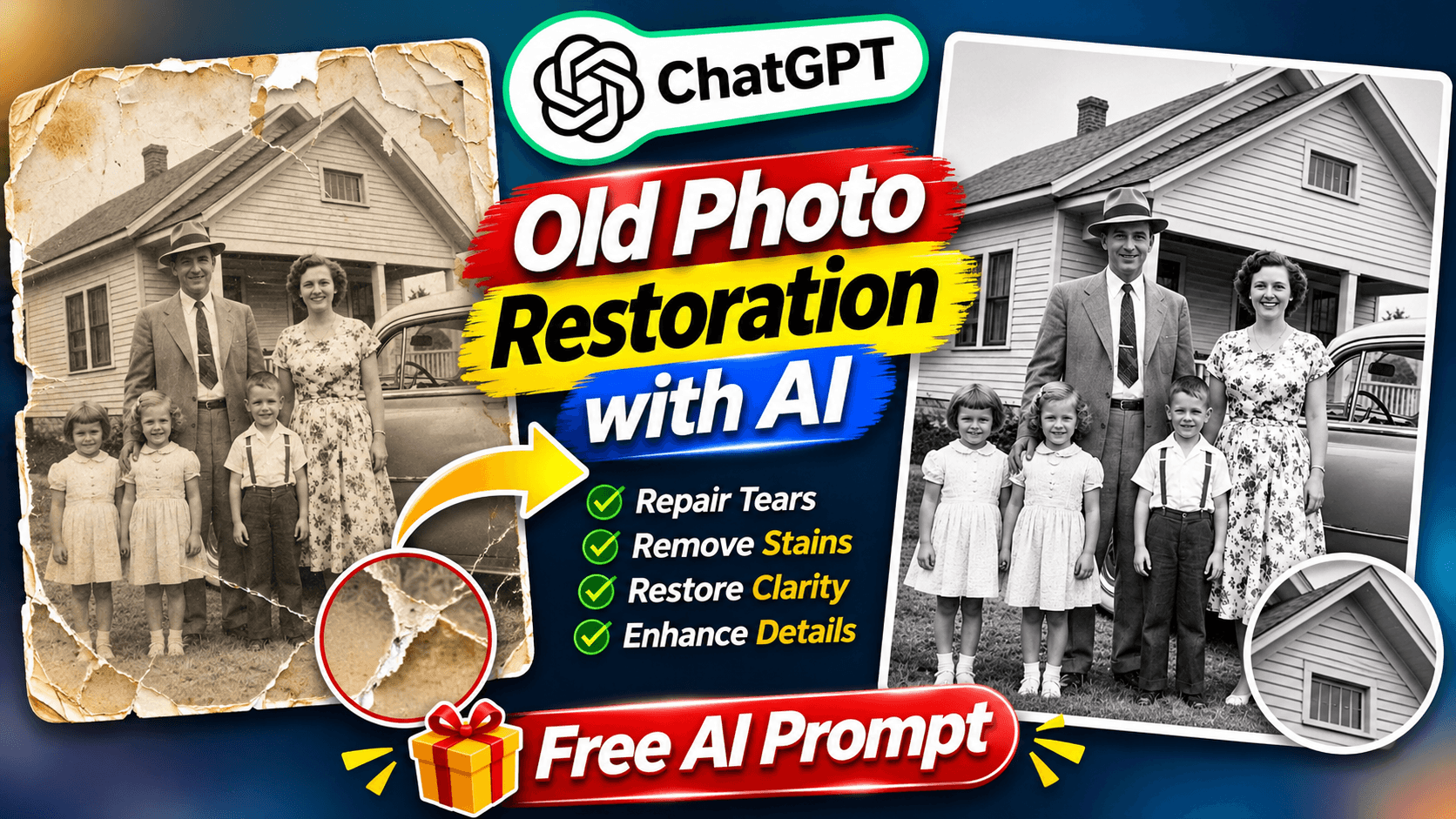
Restore your old family photographs using ChatGPT AI. Remove scratches, repair damaged pictures, enhance faded photos and colorize black-and-white memories while preserving the original faces. Get the main restoration prompt plus three bonus variations.
Family Photo Restoration Prompts: Restore Old Photos with ChatGPT AI
Do you have old family photographs that have faded over time, developed scratches or lost their original colors? Those photographs may hold some of your most precious memories. With ChatGPT AI, you can now try restoring old photographs and improving their visual quality using a simple AI photo restoration prompt.
This family photo restoration prompt is designed to repair damaged areas, improve faded colors, reduce scratches and enhance image clarity while preserving the original people, facial features and composition.
In this guide, you will get one complete old photo restoration prompt and three bonus variations:
Black & White to Color
Damaged Photo Repair
Faded Photo Enhancement
What Is AI Family Photo Restoration?
AI family photo restoration is a process of using artificial intelligence to improve the appearance of old or damaged photographs.
Old family pictures can develop scratches, dust marks, faded colors, cracks and low image clarity over time. An AI restoration prompt gives ChatGPT instructions to improve these visible issues while retaining the original appearance of the people and the photograph.
With this prompt, you can try to:
Restore old family photographs.
Remove visible scratches, dust and stains.
Repair faded and damaged photo areas.
Colorize black-and-white photographs.
Improve image sharpness and natural contrast.
Enhance faded photographs while preserving their vintage appearance.
The main goal is to improve the photograph without unnecessarily changing the original people or the memories captured in it.
Family Photo Restoration Prompt: Copy the Main Prompt
Ready to restore an old family photograph?
Upload your old photograph to ChatGPT, copy the complete prompt below and submit it.
Copy the complete AI photo restoration prompt:
Restore and enhance the uploaded old photograph into a beautifully restored, highly realistic, high-resolution photograph while preserving the ORIGINAL PEOPLE AND THEIR EXACT IDENTITY.

IMPORTANT: STRICT IDENTITY PRESERVATION

Use the uploaded photograph as the primary and exact visual reference.

Preserve every person's recognizable facial identity, face shape, eyes, eyebrows, nose, lips, hairstyle, hairline, facial hair, skin tone, age appearance and distinctive facial characteristics.

Do not replace, redesign, beautify or invent faces.

Every person in the restored image must look like the exact same person from the original photograph.

PHOTO RESTORATION:

Carefully restore the original photograph by:
- Removing scratches, dust, stains and visible damage.
- Repairing faded and damaged areas.
- Reducing image noise and unwanted grain.
- Improving clarity and sharpness naturally.
- Recovering visible facial details without changing facial features.
- Correcting faded exposure and contrast.
- Improving lighting and tonal balance.
- Reconstructing minor damaged background areas carefully.

NATURAL COLORIZATION:
If the uploaded photograph is black and white, add realistic, historically appropriate natural colors.

Use natural skin tones, realistic hair colors, authentic clothing colors and balanced environmental colors.

If the photograph is already colored but faded, restore its original-looking natural colors without unnecessarily changing the color scheme.

Keep colors subtle, realistic and believable.

PRESERVE ORIGINAL COMPOSITION:
Keep the original people, facial expressions, poses, clothing styles, body proportions, background, objects and overall photographic composition unchanged.

Do not add new people, remove existing people or change the original scene.

Do not modernize the clothing or background.

REALISTIC PHOTOGRAPHIC QUALITY:
Make the restored photograph look like a carefully preserved original photograph captured with a good-quality camera.

Use natural skin texture, realistic details, balanced contrast, authentic colors and professional photographic clarity.

IMPORTANT RESTRICTIONS:
- Do not change the identity of any person.
- Do not invent missing facial details.
- Do not make people look younger or older.
- Do not create artificial beauty filters.
- Do not add makeup or change hairstyles.
- Do not introduce imaginary objects or background details.
- Do not add text, logos or watermarks.
- If a damaged area cannot be reliably reconstructed, preserve it naturally rather than inventing details.

FINAL RESULT:
Create a beautifully restored, naturally colored, realistic high-resolution version of the original photograph.

The restored image should preserve the original memories, people, expressions and composition while improving its visual quality as much as the available photograph allows.
Bonus Prompt 1: Black & White Photo to Color
Have an old black-and-white family photograph? Try this variation to add natural-looking colors while retaining the original appearance.
Copy the Black & White to Color prompt:
Variation 1: Black & White to Color
Colorize the uploaded black-and-white photograph with realistic, historically appropriate natural colors. Preserve the exact identity, facial features, original clothing, expressions, poses and composition of every person. Do not modernize the photograph. Create subtle, authentic colors and natural photographic details.
This variation focuses on natural colorization while maintaining the original vintage look of the photograph.
Bonus Prompt 2: Damaged Photo Repair
If your old family photograph has scratches, dust, stains or visible damage, try this Damaged Photo Repair variation.
Copy the Damaged Photo Repair prompt:
Variation 2: Damaged Photo Repair
Carefully repair this damaged vintage photograph. Remove visible scratches, dust, stains, cracks, fading and photographic damage. Restore clarity and natural contrast while preserving the exact identity and original appearance of every person. Do not invent missing facial features or alter the original scene.
This version focuses on repairing visible photographic damage without changing the original people or scene.
Bonus Prompt 3: Faded Photo Enhancement
Is your old photograph still intact but looking dull, faded or unclear? Try this Faded Photo Enhancement variation.
Copy the Faded Photo Enhancement prompt:
Variation 3: Faded Photo Enhancement
Enhance this faded old photograph into a clear, naturally detailed photograph. Improve exposure, contrast, sharpness and faded colors while keeping the original people's identities, expressions, clothing, poses and background unchanged. Preserve the authentic vintage appearance and avoid artificial over-processing.
This variation focuses on improving image clarity, exposure and faded colors while retaining the authentic vintage appearance.
How to Restore Old Family Photos Using ChatGPT
Follow these simple steps to try restoring your old family photograph:
Step 1: Open ChatGPT on your mobile or computer.
Step 2: Upload a clear digital copy of your old family photograph.
Step 3: Copy the main family photo restoration prompt from this article.
Step 4: Paste the complete prompt into ChatGPT and submit your request.
Step 5: Review the restored photograph. You can also try the three bonus variations depending on the condition of your original picture.
For better results, upload the highest-quality scan or photograph available. Avoid cropping out people or important parts of the original scene.
Which Old Photo Restoration Prompt Should You Use?
Different photographs may need different types of restoration.
Main Restoration Prompt: Best for photographs that need a combination of repair, clarity improvement and natural color restoration.
Black & White to Color: Best for old monochrome photographs that you want to see with natural-looking colors.
Damaged Photo Repair: Best for photographs with visible scratches, stains, cracks and damaged areas.
Faded Photo Enhancement: Best for photographs that have lost their original brightness, contrast or color intensity.
Choose the variation that matches the condition of your old photograph.
Important Tips for Preserving Original Family Memories
Always keep a separate copy of your original photograph.
Upload the highest-quality scan available.
Avoid using heavily compressed or blurry images.
Carefully compare the restored image with the original.
Check facial details, clothing and background before saving the result.
AI restoration cannot always recover information that is missing or severely damaged. Colorization may also introduce estimated colors rather than the photograph's historically accurate original colors. Always review the result before treating it as an authentic restoration.
Final Thoughts
Old family photographs preserve moments that can never be recreated. Scratches, fading and damage may affect their appearance, but AI tools give us another way to improve and preserve these memories.
With this family photo restoration prompt, you can try repairing damaged pictures, enhancing faded photographs and adding natural-looking colors to black-and-white memories.
You also get three bonus prompts for different restoration needs: Black & White to Color, Damaged Photo Repair and Faded Photo Enhancement.
Upload an old photograph, copy the prompt and explore how AI can help bring your family memories back into clearer view.
Explore More AI Photo Editing Prompts
Try these other creative AI photo editing ideas:
Visit NikStone Digital for more AI tools, creative prompts and practical digital resources.