ChatGPT Photo Editing Prompt for Cinematic Professional Portrait
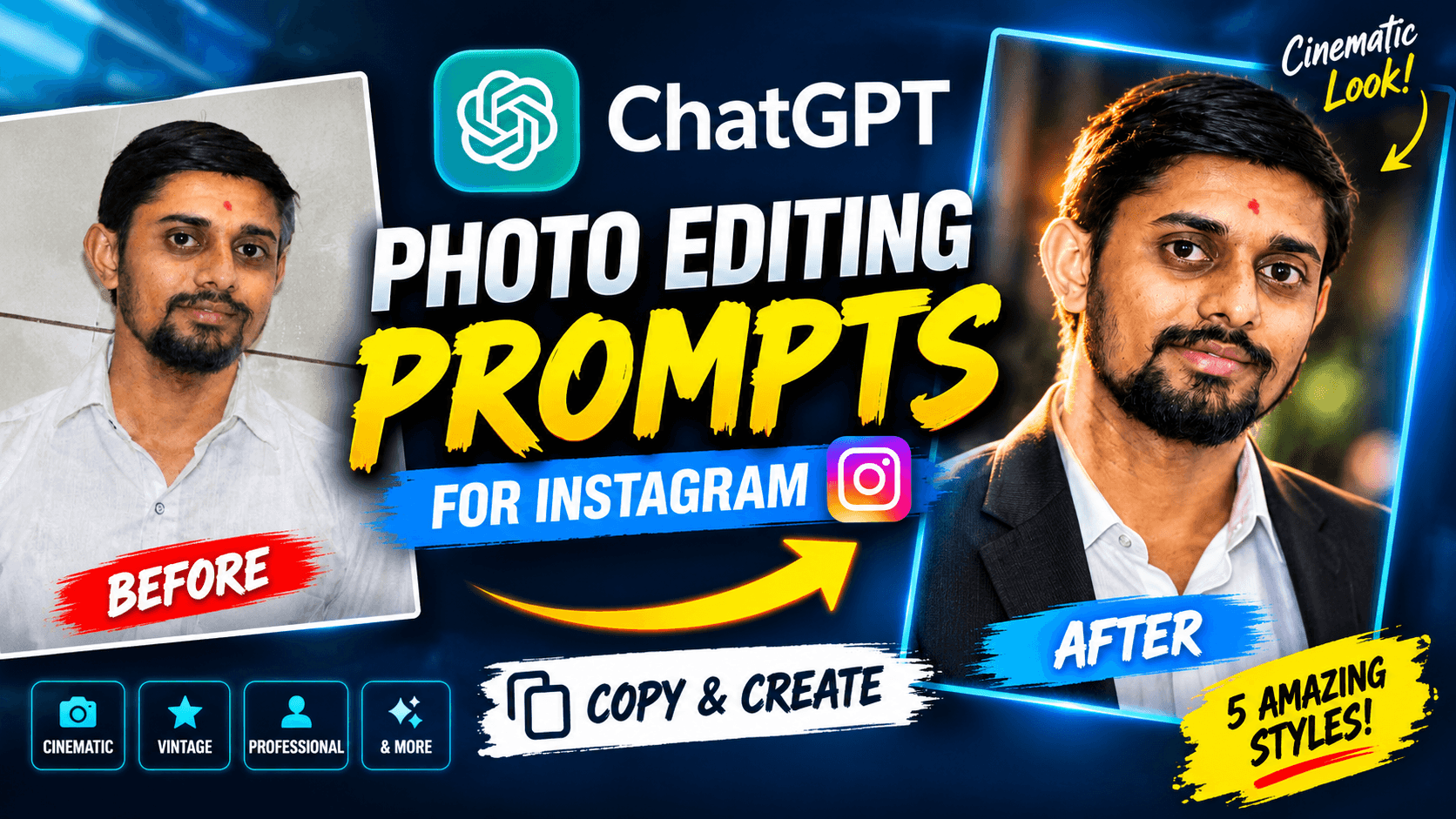
Transform your normal photo into a premium cinematic professional portrait using this free ChatGPT photo editing prompt. Copy the exact prompt, upload your photo, and create a realistic portrait while preserving your original facial identity.
ChatGPT Photo Editing Prompt for Cinematic Professional Portrait
Want to transform your normal photo into a premium cinematic professional portrait? You can use ChatGPT with an image-editing prompt to give your picture a dramatic studio look while keeping your original facial identity recognizable.
In this guide, you will find a ready-to-use ChatGPT photo editing prompt that can help transform an ordinary portrait into a professional-looking cinematic photograph.
Simply upload your photo, copy the prompt below, paste it into ChatGPT, and generate your edited image.
What Will This ChatGPT Photo Editing Prompt Create?
This prompt is designed to transform an ordinary uploaded photograph into a premium cinematic professional portrait.
The editing direction focuses on:
Dramatic professional studio lighting
Dark and elegant cinematic background
Subtle rim lighting
Realistic skin texture and natural facial details
Premium editorial photography style
Sophisticated cinematic colour grading
Professional DSLR portrait appearance
Natural body proportions and realistic appearance
The most important instruction is to preserve the person's original facial identity rather than creating a completely different-looking person.
Original Photo to Cinematic Portrait
Upload your own normal photograph and use the prompt below to create a cinematic portrait.
The final appearance can vary depending on the original photo, lighting, image quality, and the image-editing model. The goal is to guide the AI towards a professional cinematic look while retaining the person's recognizable features.
Free ChatGPT Photo Editing Prompt (Copy & Use)
You can copy the complete prompt below and use it with your uploaded photograph in ChatGPT.
PROMPT:
Transform this uploaded photo into a premium cinematic professional portrait.

IMPORTANT: Preserve the person's original facial identity, facial structure, eyes, nose, lips, hairstyle and natural skin tone. The person must remain recognizable as the same individual.

Use dramatic professional studio lighting, a dark elegant cinematic background, subtle rim lighting, realistic skin texture, natural facial details, premium editorial photography, sophisticated color grading and professional DSLR portrait quality.

Maintain the original person's natural body proportions and realistic appearance. Do not change their age, gender, facial features or identity.

Create a visually stunning, photorealistic, high-quality cinematic portrait
Tip: Copy the entire prompt, including the identity-preservation instructions. These instructions are an important part of the intended editing result.
How to Use This Prompt in ChatGPT
Follow these simple steps to edit your photo.
Step 1: Open ChatGPT
Open ChatGPT on your phone or computer and start a new conversation.
Step 2: Upload Your Original Photo
Select the photo you want to transform. A clear photograph with a visible face is a useful starting point.
Step 3: Copy the Prompt
Copy the complete cinematic professional portrait prompt from this page.
Step 4: Paste the Prompt
Paste the prompt into the ChatGPT message box along with your uploaded photo.
Step 5: Generate Your Edited Photo
Send the prompt and allow ChatGPT to process the image. Review the generated result and request adjustments if necessary.
Tips for Getting Better AI Photo Editing Results
Use a clear original photograph
A well-lit photo with a clearly visible face can give the image-editing model more useful visual information.
Choose a suitable reference image
Avoid photographs where the face is heavily blurred, hidden, or extremely small if preserving facial details is important.
Keep the identity instructions
Do not remove the instructions about preserving facial structure, natural skin tone, hairstyle, and identity. They communicate the most important requirement of this particular edit.
Try a follow-up adjustment
If the result is too dark, ask ChatGPT to make the lighting slightly brighter while maintaining the same cinematic style and facial identity.
If the background is too distracting, ask for a cleaner, darker studio background without changing the person.
Remember that results can vary
AI image editing does not guarantee perfect identity preservation. Always review the generated image and check facial details before using it as a professional profile picture.
Where Can You Use a Cinematic Professional Portrait?
A cinematic portrait can be useful for several creative purposes:
Instagram profile photographs
Professional social media posts
Personal branding
Creator profile images
Portfolio photographs
Creative photography projects
Personal website profile sections
Choose the final image style according to the platform and the purpose for which you want to use it.
Frequently Asked Questions
How do I edit my photo using ChatGPT?
Upload your photograph to ChatGPT, paste a suitable image-editing prompt, and send your request. ChatGPT can generate an edited image when image generation or editing is available in your ChatGPT experience.
Which prompt can I use to make my photo look cinematic?
Use the cinematic professional portrait prompt on this page. It includes instructions for dramatic studio lighting, a dark background, realistic skin texture, and preserving your facial identity.
Can ChatGPT change my normal photo into a professional portrait?
ChatGPT's image capabilities can help transform an uploaded photograph into a different visual style. The quality and accuracy of the result depend on the original image and the model's capabilities.
Will this prompt preserve my original face?
The prompt specifically instructs the AI to preserve your facial identity, facial structure, eyes, nose, lips, hairstyle, and natural skin tone. However, exact identity preservation cannot be guaranteed.
Can I use this ChatGPT photo editing prompt for free?
You can copy the prompt from this page for free. Image generation availability and usage limits depend on your ChatGPT plan and current product features.
Can I use this prompt on other AI image editing tools?
You can try adapting it for other image-editing tools that accept reference photos and text instructions. Results may differ because each tool has different capabilities and prompt interpretation.
Explore More Free AI Photo Editing Prompts
This cinematic portrait is just one way to transform an ordinary photograph using AI.
NikStone Digital will continue sharing practical AI photo editing prompts, creative image ideas, and useful tutorials to help you experiment with AI image generation.
Explore more resources on the NikStone Digital Blog and discover new ways to create professional-looking images with AI.
Found this prompt useful?
Try it with your own photo and explore the cinematic portrait style. Share this page with someone who wants to experiment with AI photo editing!