ChatGPT Instagram Profile Picture Prompt: Turn Any Selfie into a Professional Photo
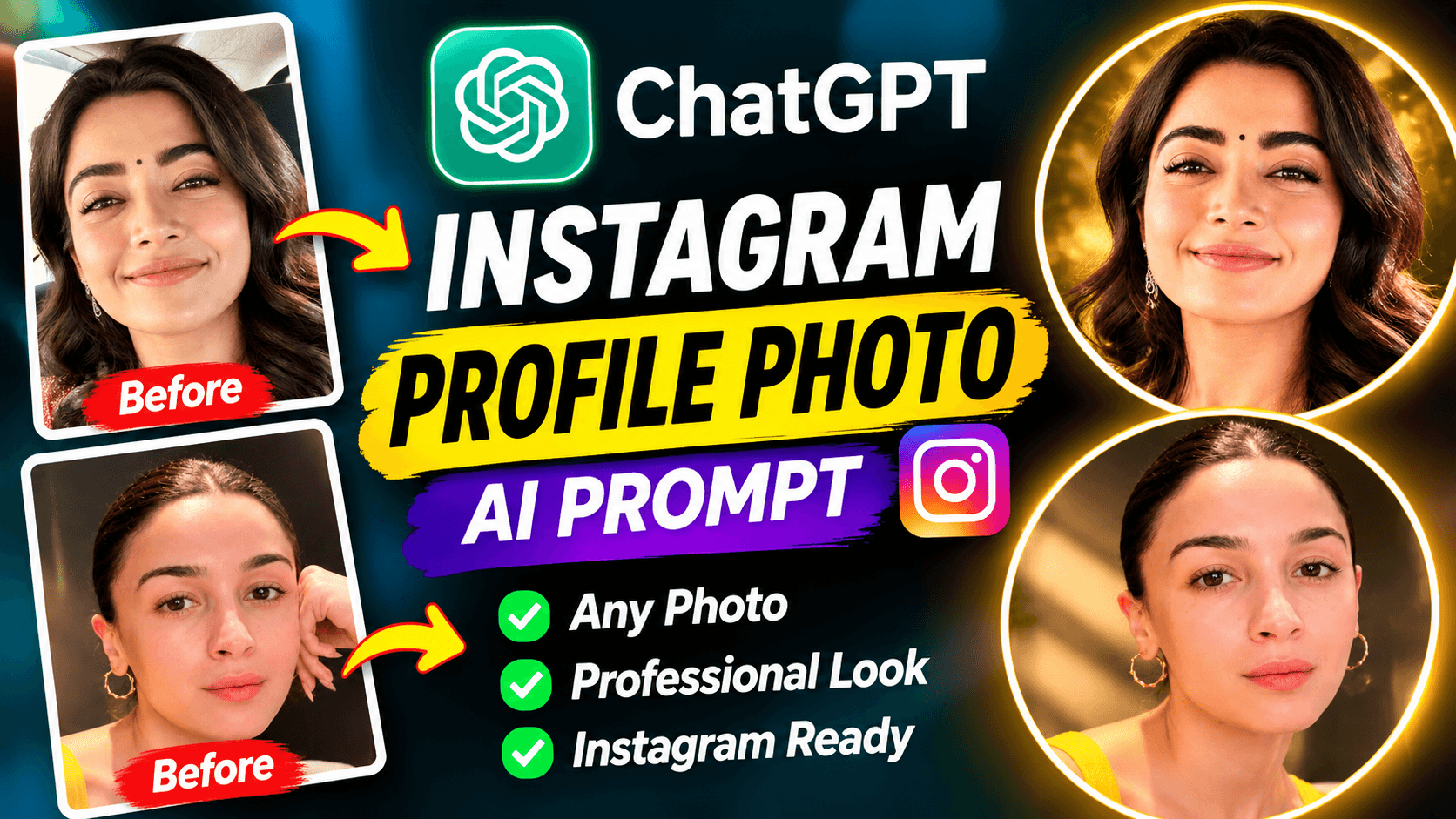
Transform an ordinary selfie into a professional-looking Instagram profile picture using this free ChatGPT photo editing prompt. Copy the prompt, upload your photo, and create a clean, centered portrait while preserving your original facial identity.
ChatGPT Instagram Profile Picture Prompt: Turn Any Selfie into a Professional Photo
Want to turn an ordinary selfie into a clean, professional-looking Instagram profile picture?
You do not always need a professional camera or studio photoshoot to experiment with a better profile image. With ChatGPT's image capabilities and a well-written photo editing prompt, you can transform an uploaded selfie into a polished portrait designed for your Instagram profile.
In this guide, you will get a free ChatGPT Instagram profile picture prompt that you can copy and use with your own photo.
The prompt focuses on professional portrait lighting, a clean background, balanced square composition, and preserving your original facial identity.
What Will This Instagram Profile Picture Prompt Create?
This prompt is designed to turn an ordinary selfie or portrait into a professional-looking Instagram profile image.
The intended transformation includes:
A clean, centered portrait composition
Square 1:1 image framing
A background that looks elegant and uncluttered
Soft professional studio lighting
Natural skin texture and sharp facial details
Balanced exposure and subtle depth of field
A polished editorial photography appearance
Enough space around the head and shoulders for circular profile cropping
The prompt also instructs the AI to preserve the original person's recognizable face, hairstyle, facial hair, skin tone, and natural appearance.
Why Is Square Composition Important for an Instagram Profile Picture?
Instagram profile pictures appear inside a circular frame. This means that an image that looks good as a full rectangle may not look equally good after being cropped into a circle.
A square 1:1 composition gives the image a useful starting format. Keeping the face centered and leaving enough space around the head and shoulders can help prevent important details from being cut off.
The prompt specifically asks for a balanced square portrait with the main subject clearly visible. Always preview the final image in a circular crop before using it as your profile picture.
Free ChatGPT Instagram Profile Picture Prompt (Copy & Use)
Use the complete prompt below to transform your selfie into a professional-looking Instagram profile portrait.
PROMPT:
Transform the uploaded photo into a stunning, premium-quality Instagram profile picture.

IMPORTANT: Use the uploaded image as the primary visual reference. Preserve the original person's exact recognizable facial identity, face shape, eyes, nose, lips, hairstyle, facial hair, natural skin tone and authentic appearance. Do not replace, redesign or unnecessarily beautify the face.

COMPOSITION:
Create a perfectly balanced square 1:1 profile portrait. Keep the main subject centered, with the face clearly visible and enough space around the head and shoulders so it looks excellent when cropped into Instagram's circular profile picture.

PHOTOGRAPHY STYLE:
Use professional portrait photography with beautiful soft studio lighting, natural skin texture, sharp facial details, balanced exposure, subtle depth of field and premium editorial photography quality.

BACKGROUND:
Replace distracting background elements with a clean, elegant and visually appealing background that complements the subject. Use soft neutral tones or a tasteful cinematic gradient. Keep the background realistic and uncluttered.

SUBJECT:
Maintain the original clothing, natural expression and body proportions unless a small adjustment is needed for better composition. Keep the overall appearance authentic, stylish and professional.

FINAL QUALITY:
Create a visually attractive, photorealistic, high-resolution Instagram profile picture that looks professionally photographed and stands out clearly at small display sizes.

Do not add text, watermarks, logos, artificial beauty filters, exaggerated effects or extra people.

If the uploaded image contains multiple subjects, prioritize the main clearly visible subject and create a clean individual profile composition. If the image is not a portrait, adapt the main subject into a clean, centered profile-style composition without inventing a person's identity.
Important: Copy the complete prompt, including the instructions about identity preservation and square composition. These are central to the intended result.
How to Use This Prompt in ChatGPT
Follow these simple steps to create your Instagram profile picture.
Step 1: Open ChatGPT
Open ChatGPT on your phone or computer and start a new conversation.
Step 2: Upload Your Selfie
Choose the photo you want to transform. A clear image with a visible face is a useful starting point.
Step 3: Copy the Prompt
Copy the complete Instagram profile picture prompt from this page.
Step 4: Paste the Prompt
Paste the prompt into ChatGPT along with your uploaded photograph.
Step 5: Generate Your Profile Picture
Send your request and let ChatGPT process the image. Review the result and ask for adjustments if necessary.
Step 6: Check the Circular Crop
Before using the image, check how it looks when cropped into a circle. Make sure your face, hairstyle, and other important details remain visible.
Tips for Getting a Better Instagram Profile Photo
Choose a clear selfie
A photograph with a clearly visible face and reasonable lighting gives the image-editing model useful visual information.
Keep your face centered
Your face should remain comfortably inside the central area of the square image. Avoid placing important details too close to the edges.
Use a simple background
A clean background can help your face stand out, especially when the image is displayed at a small size.
Avoid excessive beauty effects
A professional profile picture should still look like you. The prompt asks for natural skin texture and authentic facial details instead of exaggerated beauty filters.
Check the final image at a small size
A profile image may look impressive when viewed full-size but lose clarity when displayed as a small circle. Preview it at a smaller size before choosing it.
Where Can You Use This AI-Generated Profile Picture?
A professional-looking portrait can be useful for:
Instagram personal profiles
Instagram creator accounts
Business and professional profiles
Facebook profile pictures
WhatsApp display pictures
Personal branding
Creator and portfolio profiles
You can also request a different background or lighting style while keeping the same general square composition.
Can You Use Any Selfie for This Prompt?
The prompt is designed to work with different types of uploaded photographs, but the result depends on the quality and content of the original image.
A clear selfie with a visible face is generally a good starting point. If the original photo contains multiple people, the prompt instructs the AI to focus on the main clearly visible subject.
If the photo is blurry, heavily filtered, or has the face partially hidden, the result may not preserve all details accurately.
AI image editing also cannot guarantee perfect facial identity preservation. Review the generated result carefully before using it publicly.
Frequently Asked Questions
How can I make my selfie look professional for Instagram?
Upload your selfie to ChatGPT, use the Instagram profile picture prompt on this page, and generate an edited portrait. Review the square composition and circular crop before using it.
Which ChatGPT prompt is best for an Instagram profile picture?
The prompt on this page is designed for a centered, square professional portrait with soft lighting, a clean background, natural facial details, and circular-crop-friendly framing.
Can ChatGPT turn a normal selfie into a professional photo?
ChatGPT's image capabilities can help transform an uploaded selfie into a professional-looking portrait. The result depends on the original photo and the image model's capabilities.
Will this prompt preserve my original face?
The prompt specifically instructs the AI to preserve the person's recognizable facial identity, face shape, eyes, nose, lips, hairstyle, facial hair, and natural skin tone. However, exact identity preservation cannot be guaranteed.
Why should an Instagram profile picture be square?
A square 1:1 image provides a useful source format for Instagram's circular profile display. Keeping the subject centered helps reduce the chance of important facial details being cropped out.
Can I use this prompt for a business Instagram account?
Yes. You can use it to create a professional-looking profile portrait for a personal or business account. For a business logo, however, use an appropriate logo design rather than a personal portrait prompt.
Can I use this ChatGPT photo editing prompt for free?
You can copy the prompt from this page for free. Image generation availability and usage limits depend on your ChatGPT plan and current product features.
Explore More Free ChatGPT Photo Editing Prompts
Enjoy experimenting with different AI photo editing styles?
Try our other free prompt guides:
Explore more practical AI tutorials and creative resources on the NikStone Digital Blog.
Try this prompt with your own selfie and create a professional-looking Instagram profile picture!