3D Miniature AI Prompt: Turn Your Photo into a Tiny 3D Character
Turn your normal photo into an adorable, photorealistic 3D miniature character using this free AI prompt. Copy the prompt and create a tiny version of yourself standing on a giant smartphone in a detailed miniature office world.
3D Miniature AI Prompt: Turn Your Photo into a Tiny 3D Character
Have you seen those creative AI images where a tiny 3D version of a person stands on top of a giant smartphone?
You can create a similar miniature-style image using an AI image editing prompt and your own photograph.
With the right instructions, you can transform an ordinary photo into a detailed miniature 3D character while creating a creative little world around it. This prompt places the tiny character on a giant smartphone, with a laptop, coffee cup, notebook, and office accessories in the background.
In this guide, you will get a free 3D miniature AI prompt that you can copy and use with your uploaded photo.
What Will This 3D Miniature AI Prompt Create?
This prompt is designed to transform your photograph into a tiny, realistic 3D collectible-style character.
The intended image includes:
A miniature 3D version of the person in your uploaded photo
A giant modern smartphone used as the character's platform
A realistic miniature laptop and coffee cup
A notebook and stylish office desk accessories
A confident standing pose with the complete character visible
Detailed clothing, shoes, and facial features
Professional studio lighting and realistic soft shadows
Cinematic depth of field and premium 3D rendering
The key idea is to make the person look tiny compared with the smartphone and surrounding office objects, creating an imaginative miniature world.
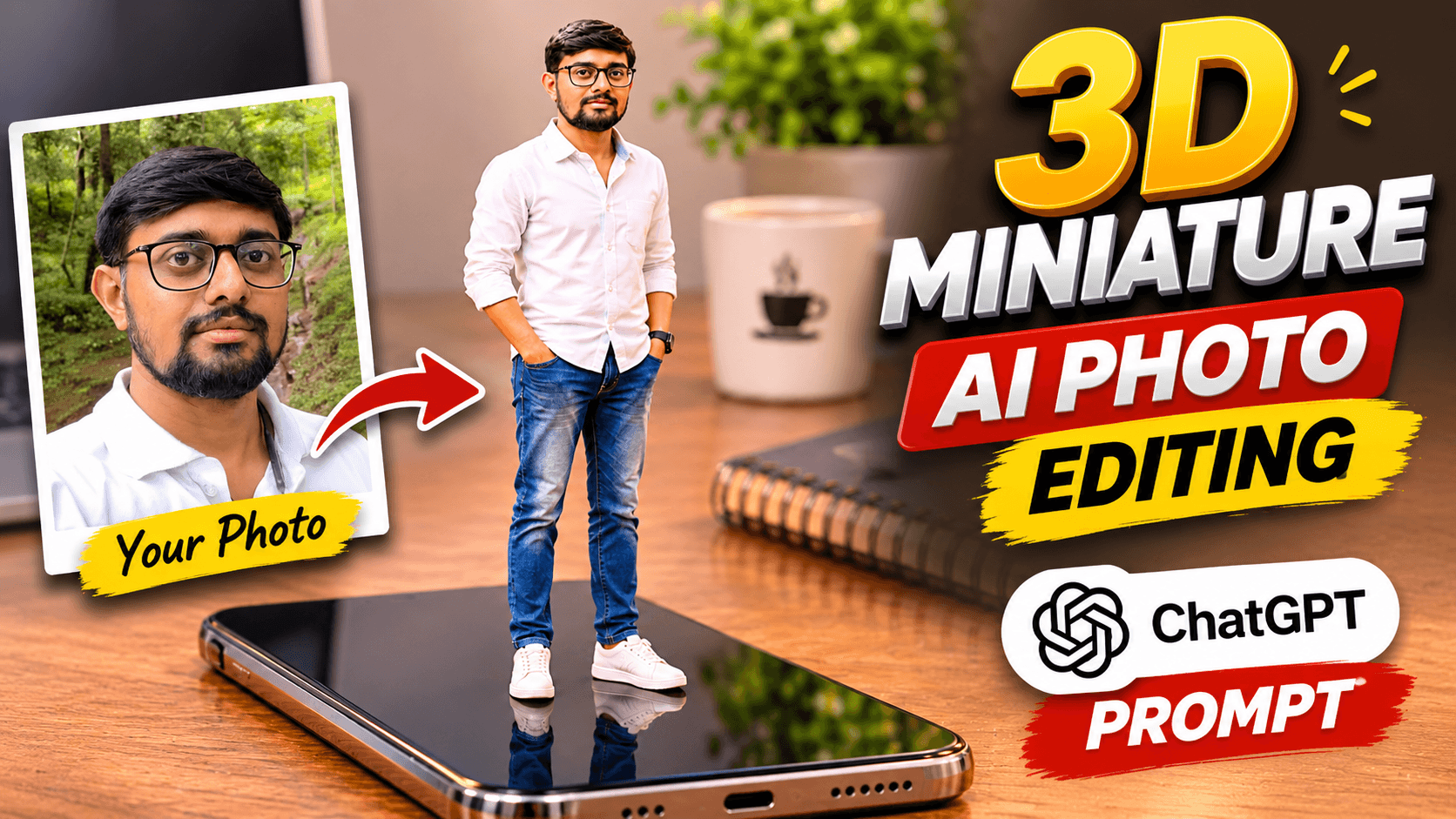
How Does the Miniature 3D Photo Transformation Look?
Start with your original photograph and use the prompt below to guide the AI transformation.
The intended result is a small, adorable 3D character that resembles the original person, standing confidently on an oversized smartphone.
The surrounding laptop, coffee cup, notebook, and desk accessories help create the illusion of a miniature office environment.
The final appearance can vary depending on your original photograph and the image-generation model.
Free 3D Miniature AI Prompt (Copy & Use)
Here is the complete prompt for creating your own miniature 3D character.
PROMPT:
Transform the uploaded photo into an incredibly detailed, photorealistic MINIATURE 3D VERSION of the same person.

IDENTITY PRESERVATION:
Use the uploaded photograph as the primary reference. Preserve the person's recognizable facial identity, face shape, eyes, nose, lips, hairstyle, facial hair and natural skin tone. The miniature character must clearly resemble the same person.

MAIN CONCEPT:
Create a tiny, adorable but realistic 3D miniature version of the person, standing confidently on top of a giant modern smartphone placed on a stylish office desk.

MINIATURE CHARACTER:
The character should have realistic human proportions with a slightly stylized collectible 3D figurine appearance. Recreate the person's original hairstyle, facial features and recognizable clothing style. Add fine details to the outfit, shoes and facial expression.

MINIATURE WORLD:
Make the smartphone look enormous compared to the tiny character. Include a realistic laptop, a miniature coffee cup, a notebook and a few elegant desk accessories in the background to create a creative miniature world.

POSE:
The tiny character should stand confidently on the smartphone screen, smiling naturally and looking toward the camera. Keep the complete character visible from head to toe.

LIGHTING AND CAMERA:
Use beautiful professional studio lighting, realistic soft shadows, subtle reflections, cinematic depth of field and premium 3D rendering quality.

VISUAL QUALITY:
Ultra-detailed 3D character design, photorealistic materials, realistic fabric textures, high-quality miniature environment, premium collectible figurine aesthetic, sharp focus and beautiful composition.

FINAL OUTPUT:
Create a visually stunning, high-resolution image that looks like a professionally designed miniature 3D world.

IMPORTANT:
Do not create a random character. The miniature character must be based on the uploaded person. Do not change the person's identity, gender or recognizable facial features. Avoid distorted hands, extra fingers, unnatural body proportions, text, logos and watermarks.
Important: Copy the complete prompt, especially the identity-preservation instructions. They tell the AI to base the miniature character on your uploaded photograph rather than creating an unrelated fictional character.
How to Create a 3D Miniature Photo Using ChatGPT
Follow these steps to create your miniature character.
Step 1: Open ChatGPT
Open ChatGPT on your mobile phone or computer and start a new conversation.
Step 2: Upload Your Photograph
Choose a clear photo of yourself. A photograph with your face and hairstyle clearly visible can be a useful starting point.
Step 3: Copy the Miniature AI Prompt
Copy the complete 3D miniature prompt from this page.
Step 4: Paste the Prompt
Paste the prompt into ChatGPT along with your uploaded photograph.
Step 5: Generate Your Miniature Character
Send your request and allow ChatGPT to process the image. The AI will attempt to create a tiny 3D version of the person in a miniature smartphone environment.
Step 6: Review the Final Image
Check the character's face, clothing, hands, body proportions, smartphone, and surrounding objects. If something looks incorrect, request adjustments.
Tips for Getting Better 3D Miniature AI Results
Use a clear reference photograph
A clear image with visible facial features and hairstyle can give the AI more useful information when creating the miniature character.
Keep the identity instructions
The prompt specifically asks the AI to preserve the person's recognizable facial identity. Keep these instructions when copying or modifying the prompt.
Make the miniature scale obvious
The smartphone should look much larger than the character. This difference in scale is an important part of the miniature-world effect.
Keep the complete character visible
The prompt asks for the tiny character to be visible from head to toe. This helps show the miniature outfit, shoes, and overall figurine design.
Use realistic surrounding objects
A laptop, coffee cup, notebook, and office accessories help establish the miniature office environment. Avoid adding too many objects that compete with the main character.
Try a follow-up adjustment
If the miniature character looks too large, you can ask ChatGPT:
"Make the character smaller compared with the giant smartphone. Keep the complete character visible from head to toe and preserve the original person's recognizable facial identity."
Where Can You Use a 3D Miniature AI Image?
This creative miniature-style image can be useful for:
Instagram posts and reels
Creative profile images
Social media content
Personalised digital artwork
AI photography experiments
YouTube thumbnails
Creative portfolio projects
Digital gifts and personalised designs
You can also experiment with different miniature environments while keeping the same basic character concept.
Can You Create a Miniature 3D Version of Your Own Photo?
Yes, you can use an uploaded photograph as a reference and ask an AI image tool to create a miniature-style character based on it.
This prompt specifically instructs the AI to retain the person's recognizable facial identity, hairstyle, facial hair, and natural skin tone while creating a stylized 3D figurine appearance.
However, exact identity preservation and realistic body proportions cannot be guaranteed. Review the generated result and request corrections if necessary.
Frequently Asked Questions
What is a 3D miniature AI prompt?
A 3D miniature AI prompt is a set of instructions used to transform an uploaded photograph or subject into a tiny, miniature-style 3D character or environment.
How can I turn my photo into a miniature 3D character?
Upload your photograph to ChatGPT, copy the 3D miniature AI prompt from this page, and send it with your image. The prompt guides the AI to create a miniature character based on your reference photo.
Can ChatGPT create a tiny version of me standing on a smartphone?
You can request this effect using the prompt on this page. It instructs the AI to create a miniature version of the uploaded person standing on a giant smartphone placed on an office desk.
Will the miniature character look like my original photo?
The prompt specifically asks the AI to preserve the person's recognizable facial identity and features. However, exact identity preservation cannot be guaranteed in every generated result.
Can I create a 3D miniature image from a selfie?
Yes. You can try using a clear selfie as the reference image. The result will depend on the visible facial details and the image model's capabilities.
Can I use this prompt for Instagram posts?
Yes. The generated miniature artwork can be used for creative Instagram posts, reels, and other social media content. Choose an appropriate image crop for your intended platform.
Can I copy this 3D miniature AI prompt for free?
Yes. You can copy the complete prompt from this page for free. Image-generation availability and usage limits depend on your ChatGPT plan and current product features.
Can I create other miniature worlds using AI?
Yes. You can experiment with other environments, such as a miniature study desk, gaming setup, creative workspace, or giant book. Change the environment instructions while retaining the reference-photo and identity-preservation requirements.
Explore More Free ChatGPT Photo Editing Prompts
Enjoy experimenting with creative AI photo transformations?
Try these other free prompt guides from NikStone Digital:
Explore more AI photo editing tutorials and creative resources on the NikStone Digital Blog.
Try this free 3D miniature AI prompt with your own photo and create your own tiny 3D world!