Butterfly Prompt ChatGPT: Create a Dreamy Butterfly AI Portrait
Transform your normal photo into a beautiful butterfly-themed portrait using this free ChatGPT AI prompt. Copy the prompt to create a dreamy garden photoshoot with colorful butterflies, golden sunlight, and a cinematic background while preserving your original facial identity.
Butterfly Prompt ChatGPT: Create a Dreamy Butterfly AI Portrait
Want to transform your ordinary photo into a beautiful, dreamy butterfly-themed portrait?
With ChatGPT's image capabilities and the right AI photo editing prompt, you can create a stunning portrait surrounded by colorful butterflies, beautiful flowers, soft greenery, and warm golden sunlight.
This creative photo transformation gives your original photograph a magical garden photoshoot appearance while asking the AI to preserve your recognizable facial identity.
In this guide, you will get a free Butterfly Prompt ChatGPT that you can copy and use with your own uploaded photograph.
What Will This Butterfly AI Photo Prompt Create?
This prompt is designed to transform an ordinary photograph into a dreamy, photorealistic butterfly-themed portrait.
The intended image includes:
Beautiful colorful butterflies in purple, violet, blue, and golden shades
Delicate butterflies flying around the person
Butterflies naturally resting on the hand or shoulder, where the pose allows
A dreamy outdoor garden background
Blooming flowers and soft greenery
Warm golden-hour sunlight
Cinematic background blur and subtle light particles
Professional portrait photography
Natural skin texture and realistic facial details
The person remains the main subject, while the butterflies add a magical and elegant visual effect.
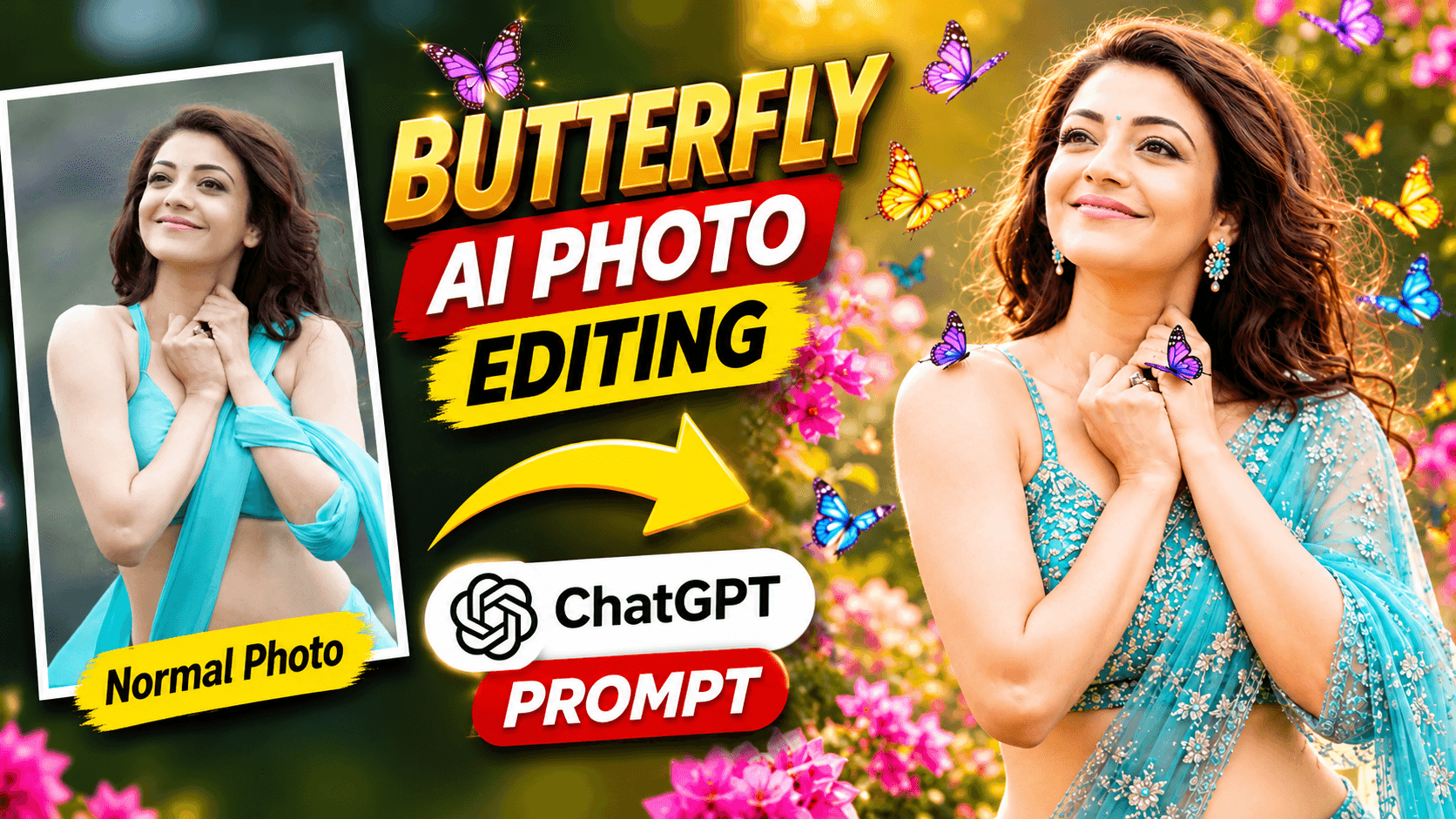
How Does the Butterfly Photo Transformation Look?
Start with your original photograph and use the prompt below to guide the AI transformation.
The intended result is a professional-looking portrait with colorful butterflies surrounding the person in a beautiful garden setting.
The combination of purple, violet, soft blue, and golden butterflies creates a visually rich composition. Warm sunlight and a softly blurred background complete the dreamy photoshoot appearance.
The final result may vary depending on the uploaded photograph and the image-generation model.
Free Butterfly Prompt ChatGPT (Copy & Use)
Here is the complete butterfly-themed AI photo editing prompt. Copy the entire prompt and use it with your uploaded photograph in ChatGPT.
PROMPT:
Transform the uploaded photo into an exceptionally beautiful, dreamy and photorealistic butterfly-themed professional portrait.

IMPORTANT IDENTITY PRESERVATION:
Use the uploaded photo as the primary reference. Preserve the person's exact recognizable facial identity, face shape, eyes, nose, lips, eyebrows, hairstyle, facial hair and natural skin tone. Do not replace, redesign or alter the person's identity.

MAIN CONCEPT:
Create a magical, elegant portrait of the same person surrounded by beautiful colorful butterflies in a dreamy cinematic garden.

BUTTERFLY EFFECT:
Add several realistic, delicate butterflies in different sizes and colors, including purple, violet, soft blue and golden shades. Some butterflies should gently fly around the person, while one or two may rest naturally on the person's hand or shoulder if the pose allows it.

PERSON AND OUTFIT:
Keep the person's natural appearance and recognizable features. Create an elegant, sophisticated photoshoot look. If suitable, enhance the outfit with tasteful details such as a flowing elegant dress, saree or stylish clothing, while maintaining a realistic appearance.

BACKGROUND:
Create a beautiful dreamy garden with blooming flowers, soft greenery, warm golden sunlight and a cinematic blurred background. Add subtle magical light particles without making the image look artificial.

LIGHTING AND PHOTOGRAPHY:
Professional DSLR portrait photography, soft golden-hour lighting, realistic skin texture, beautiful natural highlights, shallow depth of field, premium editorial composition and cinematic color grading.

COMPOSITION:
Keep the person's face clearly visible and naturally proportioned. The person should remain the main subject, with butterflies enhancing the composition rather than covering the face.

FINAL QUALITY:
Create an exceptionally beautiful, high-resolution, photorealistic butterfly-themed portrait that looks like a premium professional photoshoot.

AVOID:
Cartoon effects, artificial plastic skin, exaggerated facial changes, distorted hands, extra fingers, unnatural butterflies, text, logos and watermarks.

The final image must preserve the original person's recognizable identity and look like a real professional photograph.
Important: Copy the complete prompt, especially the identity-preservation and butterfly-effect instructions. They help communicate the intended portrait style and keep the person's face as the main focus.
How to Create a Butterfly-Themed Photo Using ChatGPT
Follow these simple steps to create your own butterfly portrait.
Step 1: Open ChatGPT
Open ChatGPT on your mobile phone or computer and start a new conversation.
Step 2: Upload Your Photo
Choose a clear photograph that you want to transform. A photo with a clearly visible face is a useful starting point.
Step 3: Copy the Butterfly Prompt
Copy the complete butterfly-themed photo editing prompt from this page.
Step 4: Paste the Prompt
Paste the prompt into ChatGPT along with your uploaded photograph.
Step 5: Generate Your Butterfly Portrait
Send your request and allow ChatGPT to process the image. Review the generated result, especially the face, butterflies, hands, and background.
Step 6: Request Adjustments if Needed
If the butterflies cover the face or the background looks too artificial, ask ChatGPT to adjust the composition while keeping the original facial identity unchanged.
Tips for Getting Better Butterfly AI Photo Results
Use a clear reference photograph
A photograph with a clearly visible face can provide useful visual information for the image-editing model.
Keep the person's face visible
The face should remain the main focus. Butterflies should complement the portrait rather than cover important facial details.
Choose natural butterfly placement
Butterflies flying around the subject or resting gently on a hand or shoulder can create a beautiful composition. Avoid overcrowding the image with too many butterflies.
Maintain realistic butterfly details
The prompt asks for realistic butterflies in purple, violet, blue, and golden shades. These colors create a rich visual effect without requiring cartoon-style elements.
Use warm natural lighting
Golden-hour sunlight, soft shadows, and subtle highlights help create the intended dreamy outdoor photography atmosphere.
Avoid excessive artificial effects
Too many magical particles, exaggerated colors, or plastic-looking skin can reduce the photorealistic appearance. Keep the final image elegant and natural.
Try a follow-up adjustment
If you want more visible butterflies, you can ask ChatGPT:
"Add a few more realistic purple, violet, and golden butterflies around the person. Keep the face completely visible and preserve the original person's recognizable facial identity. Maintain the same dreamy garden background and natural golden-hour lighting."
Where Can You Use a Butterfly AI Portrait?
This creative butterfly-themed portrait can be useful for:
Instagram posts and profile photographs
Creative social media content
Dreamy portrait photography collections
Personal photo albums
Aesthetic profile images
YouTube thumbnails
Creative digital artwork
Special occasion photographs
You can also experiment with different butterfly colors, garden backgrounds, and outfit styles to create variations of the same visual concept.
Can ChatGPT Create a Butterfly Portrait from a Normal Photo?
ChatGPT's image capabilities can help transform an uploaded photograph into a butterfly-themed portrait using detailed visual instructions.
This prompt asks the AI to preserve the person's recognizable facial identity while adding colorful butterflies, a dreamy garden background, and professional photography effects.
However, exact facial identity preservation cannot be guaranteed in every generated result. The outcome may vary depending on the original photograph and the image model's capabilities.
Always review the final image before sharing it.
Frequently Asked Questions
What is a butterfly prompt in ChatGPT?
A butterfly prompt is a set of instructions that guides an AI image tool to transform an uploaded photograph into a portrait featuring beautiful butterflies and a dreamy visual environment.
How can I create a butterfly-themed photo using ChatGPT?
Upload your photograph to ChatGPT, copy the butterfly prompt from this page, and send it with your image. The prompt guides the AI towards a photorealistic butterfly-themed portrait.
Which butterfly colors are included in this prompt?
The prompt requests purple, violet, soft blue, and golden butterflies in different sizes.
Can butterflies be placed on my hand or shoulder?
Yes. The prompt asks the AI to place one or two butterflies naturally on the person's hand or shoulder if the original pose allows it.
Will this prompt preserve my original face?
The prompt specifically instructs the AI to preserve the person's recognizable facial identity, facial structure, hairstyle, and natural skin tone. However, exact identity preservation cannot be guaranteed.
Can I use this butterfly prompt for a saree photo?
Yes. The prompt allows elegant styling such as a flowing dress, saree, or other suitable clothing while maintaining a realistic appearance.
Can I use this prompt for free?
You can copy the prompt from this page for free. Image-generation availability and usage limits depend on your ChatGPT plan and current product features.
Can I use this butterfly prompt in other AI image editing tools?
You can try adapting the prompt for other tools that support uploaded reference photographs and text instructions. The final results may vary between tools.
Explore More Free ChatGPT Photo Editing Prompts
Enjoy experimenting with different AI photo editing styles?
Try these other free prompt guides from NikStone Digital:
Explore more creative AI tutorials and photo editing resources on the NikStone Digital Blog.
Try this free Butterfly Prompt ChatGPT with your own photo and create a beautiful dreamy butterfly portrait!